Tasks and Projects by Text - Capture, Track, and Finish What Matters
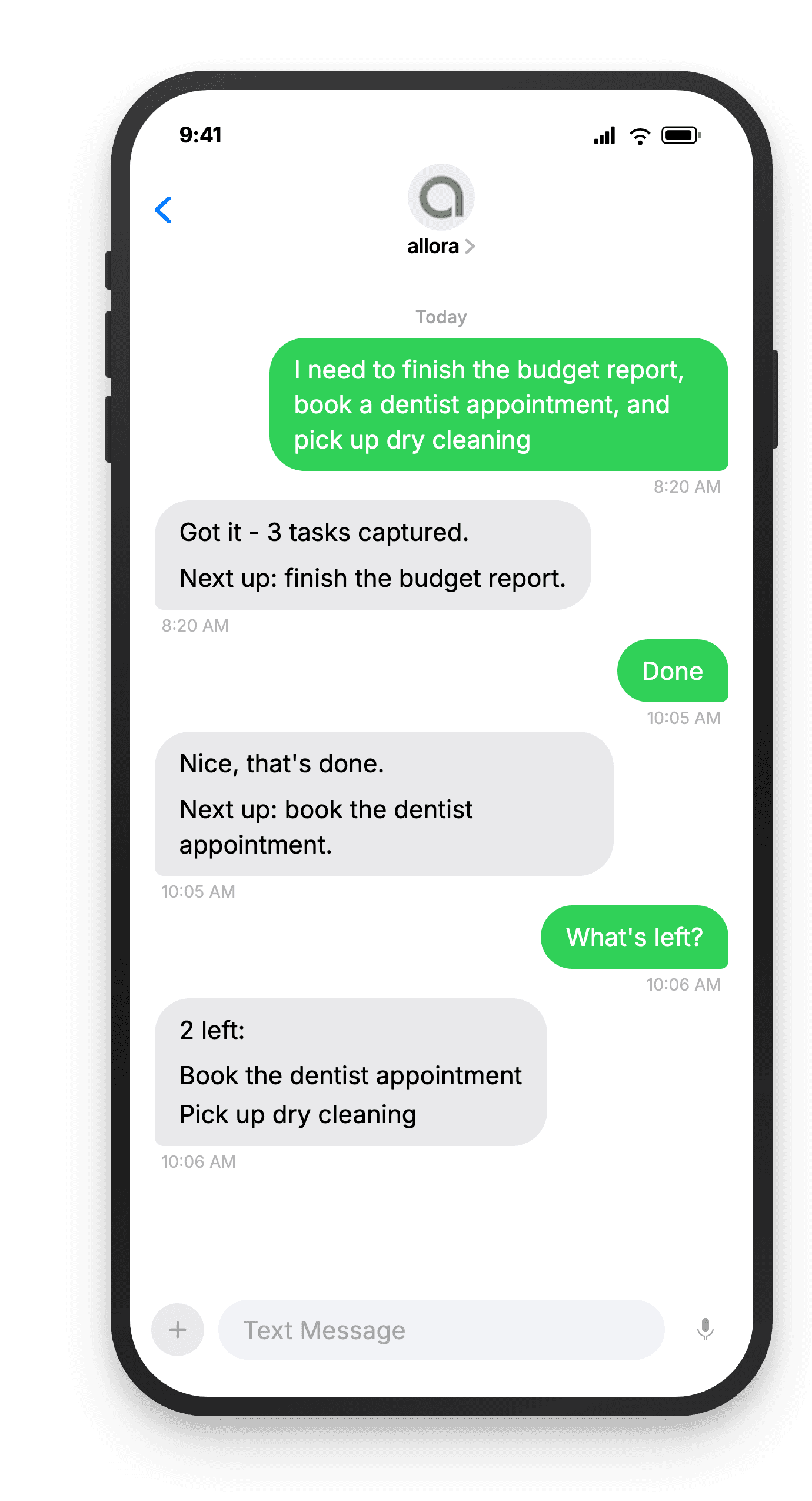
Text allora your tasks and it organizes them. Get nudges when things sit too long. Reply done when you finish. No app, no project board, no weekly review.
Free for 3 days, then $15/mo. Cancel anytime.
Your To-Do List Should Work as Fast as You Think
Tasks and projects by text mean you capture what needs doing the moment you think of it. No app to open, no form to fill out. Text allora your tasks and it keeps them organized, nudges you when things sit too long, and lets you mark things done with a reply.
Task apps are overbuilt for most people
You do not need Gantt charts and sprint boards for personal tasks. allora keeps it simple - text what you need to do, get nudged when it matters, reply done when you finish. That is it.
You forget to check your to-do list
The best task list in the world does nothing if you never look at it. allora comes to you - it sends a text when something needs attention instead of waiting for you to remember to open an app.
Capturing a task should be instant
By the time you unlock your phone, open an app, and type into a form field, the thought is half gone. With allora, you text it in three seconds and move on. The task is saved before you can forget it.
Brain dump your tasks. allora keeps them moving.
How It Works
Three steps. No signup flow, no tutorial, no settings to configure.
Text allora what you want to remember
Brain dump your tasks, reminders, and random thoughts. "Return the Amazon package before Friday" or "remind me to call mom tomorrow at 2pm" - just text it like you'd tell a friend.
remind me to call mom tomorrow at 2pm
We schedule the reminder automatically
Tasks, deadlines, and reminders are pulled out automatically. allora figures out what matters most and lines it up for you.
Got it! Call mom - reminder set for tomorrow, 2 PM ✓
You get a reminder text at the right time
allora sends your reminders on time and nudges you with the next task when you're ready. Complete it, skip it, or dump more - all by text.
🔔 Reminder: Call mom
Ready to get things out of your head?
Text your tasks. allora organizes them. You finish them.
Try It FreeWhat allora can do
More Than Just Tasks
allora does more than track tasks. Here is everything it can do by text.
Text Message Reminders
Set one-time or recurring reminders by texting in plain English. allora texts you back when the moment arrives.
Voice Memos
Send a voice note instead of typing. allora transcribes it and turns it into a task or reminder automatically.
Calendar-Aware Scheduling
Connect Google or Apple Calendar. allora checks your schedule and finds the right time for reminders.
Article & Video Summaries
Send any article URL or YouTube link. allora summarizes it and saves the key points for you.
Notes & Shopping Lists
Text a grocery list or a quick note. allora keeps it organized and sends it back when you need it.
Inspiration Mode
Get daily affirmations, motivational quotes, journal prompts, or sweet messages - on your schedule.
Tasks & Projects
Capture tasks in a text. allora organizes them, tracks progress, and nudges you to keep moving.
Works on Any Phone
No app to download. allora works entirely by text message - iPhone, Android, or any phone that texts.
Tasks and Projects by Text - Common Questions
Just text them. Send allora a message like "I need to call the dentist" or "pick up groceries, return library books, email landlord" and allora extracts each task and saves it. You can send one task at a time or brain-dump several in a single message. allora understands natural language so you do not need any special format or keywords. If you include a time or date, allora sets a reminder automatically. If you do not, it saves the task to your list and nudges you about it later. Capturing a task is as fast as sending a text to a friend.
Yes. If you text allora a complex task, it can break it into smaller steps. For example, texting "plan the birthday party" might result in allora suggesting subtasks like book a venue, send invitations, and order the cake. You can also add steps yourself over time - "add to birthday party: pick up balloons." allora groups related tasks together so you can see everything in one place. When you ask for your task list, projects appear with their subtasks underneath. This keeps bigger efforts organized without requiring a project management tool or complicated setup.
allora checks in when tasks have been sitting for a while. If you added something a few days ago and have not marked it done, allora sends a gentle text suggesting it as your next action. These nudges are not aggressive - allora recommends one task at a time based on what seems most relevant or time-sensitive. You can reply "done" to mark it complete, "skip" to push it aside for now, or just ignore it. allora learns from your responses and adjusts its timing over time. The goal is to keep things moving without making you feel overwhelmed or nagged.
Yes. Include a date or time when you text the task. "Renew passport by March 15" or "email the client by end of day Friday" both work. allora saves the deadline and factors it into when it nudges you about the task. Tasks with approaching deadlines get surfaced earlier. If you do not set a deadline, allora still tracks the task and nudges you based on how long it has been sitting. You can add or change a deadline later too - text "the passport thing is due next Friday" and allora updates it. Deadlines are optional but helpful for time-sensitive items.
Reply "done" when allora nudges you about a task, or text something like "finished the passport renewal" or "returning shoes is done" anytime. allora uses fuzzy matching to figure out which task you mean, so you do not need to use the exact same wording. If allora is not sure which task you are referring to, it asks for clarification. You can also text "done" followed by a number if you have a numbered list. Marking tasks complete is intentionally simple - the whole point is that a two-second text reply moves things forward without any friction or ceremony.
Yes. Text "list" or "show my tasks" and allora sends you everything that is currently active. Tasks are grouped by type - tasks with deadlines, recurring reminders, and general items each appear in their own section. If your list is long, allora sends it across multiple messages to keep things readable. You can also ask for specific subsets like "what is due this week" or "show my work tasks." The list command gives you a quick snapshot of everything on your plate without opening any app. It is like asking a friend to read back your to-do list.
Most to-do list apps require you to open the app, create a task, set parameters, and remember to check back. allora lives in your text messages. You capture tasks the same way you would tell a friend - no forms, no fields, no tapping through screens. allora also proactively nudges you about stale tasks instead of waiting for you to open an app and look at a list. The experience is conversational rather than transactional. If a full project management tool feels like overkill for your personal to-do list, allora is designed to be simpler, faster, and harder to ignore.
Completed tasks are archived, not deleted. They disappear from your active list so you only see what still needs doing. If you want to look back at what you have accomplished, you can ask allora for your completed tasks or request a weekly recap. The recap shows how many tasks you finished, which ones are still open, and any patterns allora has noticed. This gives you a sense of progress without cluttering your active view. Archived tasks stay in your account indefinitely, so you always have a record of what you have done. Nothing is permanently deleted unless you ask for it.