Notes and Shopping Lists by Text - Capture It, Get It Back When You Need It
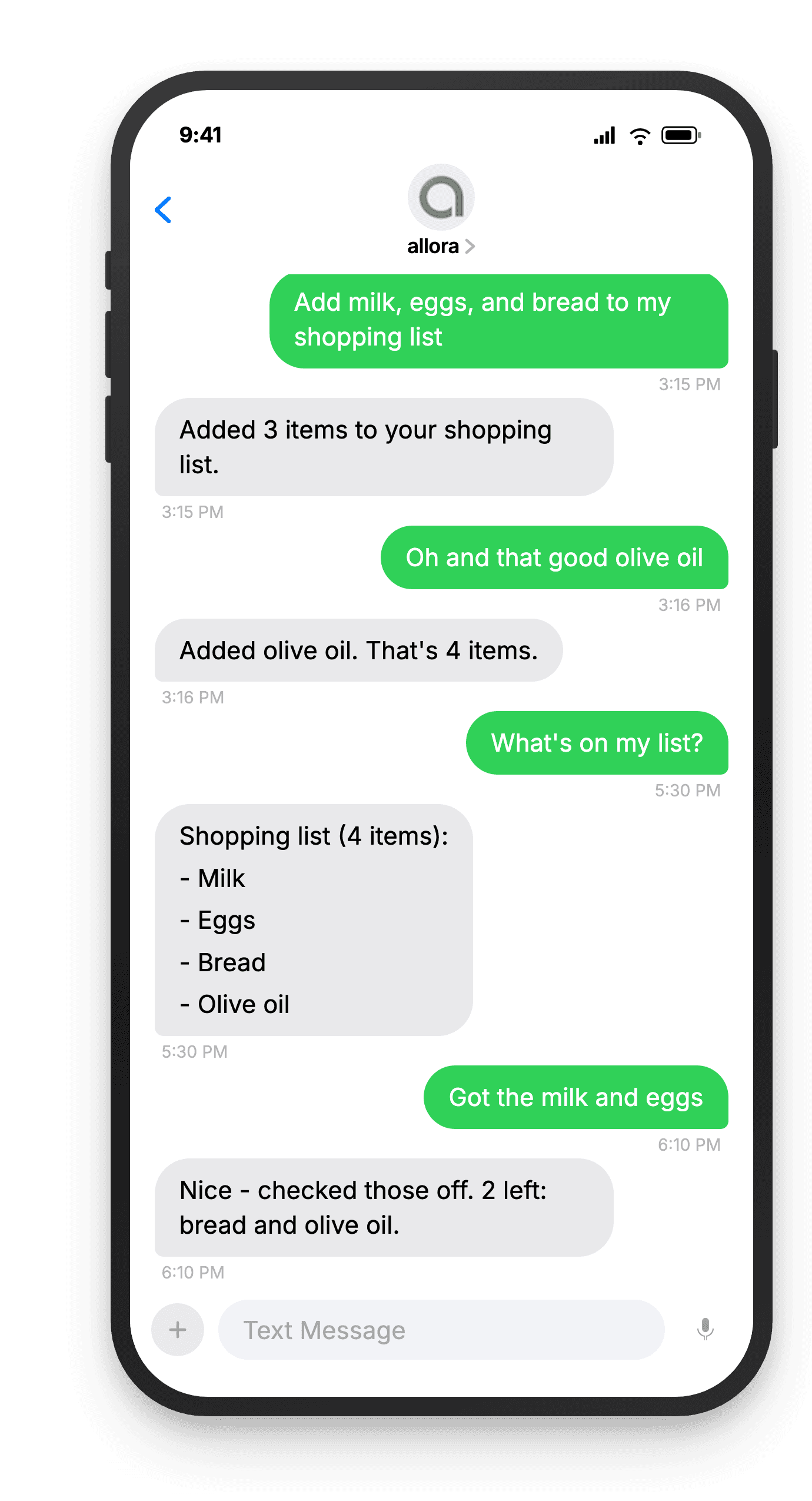
Text a grocery list, a quick note, or a random thought to allora. It keeps everything organized in one text thread.
Free for 3 days, then $15/mo. Cancel anytime.
Your Lists Should Live Where You Already Are
Notes and shopping lists by text mean you never need to open another app to capture a thought or add to a list. Text allora like you would text a friend - items, notes, random thoughts - and ask for them back whenever you need them.
Notes apps are one more thing to check
You already have too many apps. A quick thought should not require unlocking your phone, finding the right app, and navigating to the right note. With allora, send a text and it is saved.
Lists scattered across apps
Grocery list in one app, packing list in another, random notes somewhere else. allora keeps all your lists in one text thread. Ask for any list and it arrives in your messages.
Adding to a list should not require opening an app
You think of something while driving, cooking, or walking. Texting is faster and safer than finding an app. Send allora a quick text and the item is on your list instantly.
Build your list all week. Get it when you need it.
How It Works
Three steps. No signup flow, no tutorial, no settings to configure.
Text allora what you want to remember
Brain dump your tasks, reminders, and random thoughts. "Return the Amazon package before Friday" or "remind me to call mom tomorrow at 2pm" - just text it like you'd tell a friend.
remind me to call mom tomorrow at 2pm
We schedule the reminder automatically
Tasks, deadlines, and reminders are pulled out automatically. allora figures out what matters most and lines it up for you.
Got it! Call mom - reminder set for tomorrow, 2 PM ✓
You get a reminder text at the right time
allora sends your reminders on time and nudges you with the next task when you're ready. Complete it, skip it, or dump more - all by text.
🔔 Reminder: Call mom
Ready to simplify your lists?
Text your list. Get it back when you need it. That is it.
Try It FreeWhat allora can do
More Than Just Lists
allora does more than keep lists. Here is everything it can do by text.
Text Message Reminders
Set one-time or recurring reminders by texting in plain English. allora texts you back when the moment arrives.
Voice Memos
Send a voice note instead of typing. allora transcribes it and turns it into a task or reminder automatically.
Calendar-Aware Scheduling
Connect Google or Apple Calendar. allora checks your schedule and finds the right time for reminders.
Article & Video Summaries
Send any article URL or YouTube link. allora summarizes it and saves the key points for you.
Notes & Shopping Lists
Text a grocery list or a quick note. allora keeps it organized and sends it back when you need it.
Inspiration Mode
Get daily affirmations, motivational quotes, journal prompts, or sweet messages - on your schedule.
Tasks & Projects
Capture tasks in a text. allora organizes them, tracks progress, and nudges you to keep moving.
Works on Any Phone
No app to download. allora works entirely by text message - iPhone, Android, or any phone that texts.
Notes and Lists by Text - Common Questions
Just text allora with what you want on the list. Say something like "add to grocery list: eggs, milk, bread" or "shopping list: paper towels, dish soap." allora creates the list automatically based on what you text. You do not need to set up the list first or name it in advance - allora figures out what kind of list you mean from context. You can also just text a bunch of items and allora organizes them into a list for you. It works the same way you would text a friend to pick something up at the store.
Yes. You can have a grocery list, a packing list, a reading list, and any other list you need - all running at the same time. allora keeps them separate based on the name you use. When you say "add to grocery list" it goes to your grocery list. When you say "add to packing list" it goes there instead. To see a specific list, just ask - "send me my packing list" or "what is on my grocery list." allora keeps each list organized independently so items never bleed from one into another.
Text allora with the items and mention which list. For example, "add butter and cheese to grocery list" or "also need sunscreen for the packing list." If you recently added to a list and text more items without specifying which list, allora assumes you mean the same one. You can add a single item or several at once separated by commas. allora confirms what was added and tells you the total count so you know everything landed. Adding items takes one text message - no app to open, no screen to navigate.
Yes. Text something like "remove eggs from grocery list" or "take bread off the list" and allora removes it. You can also mark items as done while you shop - reply with the item name and allora checks it off. If you want to clear an entire list and start fresh, text "clear my grocery list" and allora wipes it clean. Removing items works the same natural language way as adding them. allora confirms what was removed so you always know the current state of your list without having to ask for the full thing.
Yes. You can set a reminder tied to your list. Text something like "remind me Saturday morning to check my grocery list" and allora sends you the full list at that time. This is helpful when you want to review what you need before heading to the store. You can also set recurring reminders - "every Sunday at 9am send me my grocery list" works too. The reminder includes all current items so you have everything in one message. It is like having a friend text you your shopping list right when you need it.
Yes. Text allora anything you want to remember and it saves it. Things like "note: the wifi password at the cabin is sunflower99" or "remember that Sarah likes oat milk." You can ask for your notes later - "what was the wifi password" or "what does Sarah like" and allora pulls up what you saved. Notes work alongside lists and reminders in the same text thread. There is no separate notes app to check. Everything lives in one conversation. It is useful for random details you need to capture in the moment and retrieve later.
Yes, grocery lists are one of the most popular uses. You can build your grocery list throughout the week as you think of things - text allora from the kitchen when you notice you are out of something, or add items while you are at work. When you get to the store, text "send me my grocery list" and you have everything in one message. You can check items off as you shop by replying with the item name. No more forgetting what you needed or scrolling through a notes app in the aisle. It works exactly like texting someone your list.
There is no practical limit on the number of items you can add to a list. Most people have between five and thirty items on a grocery list and allora handles that easily. If your list gets very long, allora may send it across multiple text messages to keep things readable. You can also ask for a summary instead of the full list - "how many items on my grocery list" gives you the count without listing everything. For most everyday uses like grocery lists, packing lists, and to-do lists, you will never hit a limit that matters.