Article and Video Summaries by Text - Send a Link, Get the Key Points
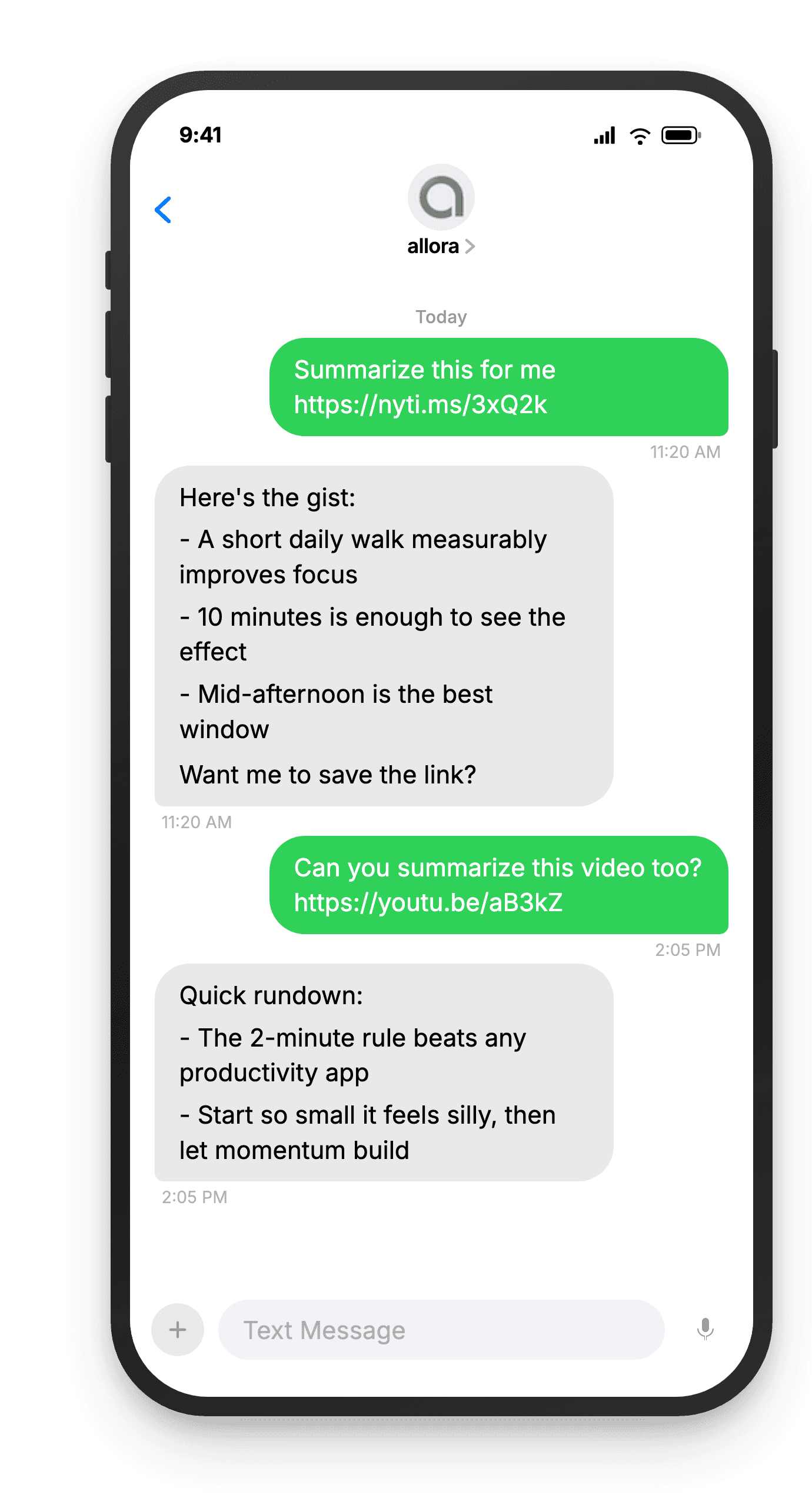
Paste any article URL or YouTube link into your text thread with allora. Get the key takeaways back in seconds.
Start with 3 days free, then choose annual or monthly pricing.
Read Less. Know More.
Article and video summaries by text mean you can triage your reading list without opening a browser tab. Send a link, get the main points, and decide if it is worth your full attention - all from your text messages.
You save articles you never read
Bookmarks pile up. Read-later apps collect dust. With allora, send the link and get the summary now. You learn the key points immediately instead of adding to an infinite backlog.
Long videos hide the good stuff
A 45-minute video might have 3 minutes of useful content. allora summarizes YouTube videos so you get the takeaways without watching the whole thing. Watch the full video only when it is worth it.
Links get lost across apps
You find an article on your phone, email it to yourself, then forget about it. With allora, every link you send is saved and retrievable. Ask for your links anytime and they are right there in your texts.
Send a link. Get the takeaways. Set a reminder.
How It Works
Three steps. No signup flow, no tutorial, no settings to configure.
Text allora what you want to remember
Brain dump your tasks, reminders, and random thoughts. "Return the Amazon package before Friday" or "remind me to call mom tomorrow at 2pm" - just text it like you'd tell a friend.
remind me to call mom tomorrow at 2pm
We schedule the reminder automatically
Tasks, deadlines, and reminders are pulled out automatically. allora figures out what matters most and lines it up for you.
Got it! Call mom - reminder set for tomorrow, 2 PM ✓
You get a reminder text at the right time
allora sends your reminders on time and nudges you with the next task when you're ready. Complete it, skip it, or dump more - all by text.
🔔 Reminder: Call mom
Ready to triage your reading list by text?
Send a link. Get the summary. Save hours every week.
Try It FreeWhat allora can do
More Than Just Summaries
allora does more than summarize. Here is everything it can do by text.
Text Message Reminders
Set one-time or recurring reminders by texting in plain English. allora texts you back when the moment arrives.
Voice Memos
Send a voice note instead of typing. allora transcribes it and turns it into a task or reminder automatically.
Calendar-Aware Scheduling
Connect Google or Apple Calendar. allora checks your schedule and finds the right time for reminders.
Article & Video Summaries
Send any article URL or YouTube link. allora summarizes it and saves the key points for you.
Notes & Shopping Lists
Text a grocery list or a quick note. allora keeps it organized and sends it back when you need it.
Inspiration Mode
Get daily affirmations, motivational quotes, journal prompts, or sweet messages - on your schedule.
Tasks & Projects
Capture tasks in a text. allora organizes them, tracks progress, and nudges you to keep moving.
Works on Any Phone
No app to download. allora works entirely by text message - iPhone, Android, or any phone that texts.
Article and Video Summaries - Common Questions
allora can summarize most article URLs from news sites, blogs, and publications. It also handles YouTube videos by processing the video content and giving you the key takeaways. Social media posts from platforms like X and Instagram are saved with their content intact. allora works best with text-heavy content like news articles, how-to guides, opinion pieces, and long-form blog posts. Some sites with hard paywalls may not be accessible - in those cases allora lets you know it cannot reach the content and saves the link for you to read later on your own.
allora keeps summaries concise enough to fit in a few text messages. For a typical article, you get three to five key bullet points covering the main ideas. For longer or more complex pieces, the summary might be slightly longer but allora always prioritizes brevity over completeness. The goal is to help you decide whether the full article is worth your time, not to replace reading it. If you want more detail on a specific point, you can ask allora a follow-up question about the article and it pulls from the original content to answer you.
Yes. Paste a YouTube link into your text thread with allora and it processes the video content to extract the key points. This works for tutorials, talks, interviews, and most other video formats. allora gives you a summary of the main ideas and any action items mentioned in the video. If the video is very long, allora focuses on the most important takeaways rather than trying to cover everything. It saves the link so you can watch the full video later if the summary catches your interest. This is especially useful for long videos you do not have time to watch right away.
Yes. After allora summarizes an article, you can ask questions about it. For example, if the summary mentions a statistic, you can text "what was the exact number" and allora pulls from the original content to give you more detail. This works best right after the summary while the article is still in context. Follow-up questions help you dig deeper without re-reading the whole piece. If you come back to the article later, you can also ask allora to re-summarize it or give you a different angle on the content. It is like having a conversation about what you just read.
allora saves every link you send as a task in your list. This means you can always find it later by asking "what links have I saved" or "send me my reading list." You can also set a reminder to come back to a link - "remind me tonight to read that article" and allora sends it back at the time you choose. Links are never deleted unless you tell allora to remove them. Think of it as a reading list that lives in your text messages. You build it by sending links whenever you find something interesting, and retrieve it whenever you have time to read.
allora uses AI to read and condense article content, so summaries reflect the main points of the original piece. Like any summary, some nuance may be lost - allora focuses on the key takeaways rather than every detail. For factual accuracy, allora pulls directly from the article text rather than generating information on its own. If a summary seems off or you want to verify something, the original link is always saved so you can check the source. allora is best used as a way to triage your reading list and decide what deserves your full attention, not as a replacement for reading.
Yes. If you text a link with a note like "save this for later" or "add to reading list," allora saves the link without summarizing it. It extracts the page title so you can identify it later and adds it to your list. When you are ready to read it or want the summary, just ask - "summarize that article I saved" or "what was that link about." This is useful when you are in a hurry and just want to bookmark something from a text conversation or social media without stopping to read the summary right then.
No. Article and video summaries are included in your allora plan at no extra charge. Every plan includes unlimited summaries along with reminders, tasks, lists, and all other features. During your 3-day free trial, you have full access to summaries so you can try it with your own articles and videos before choosing a plan. There are no per-summary fees and no usage limits on how many links you can send per day. The pricing is simple - annual or monthly covers everything allora does, including summaries, reminders, calendar sync, and more.