allora vs OneNote: A Simpler Alternative for Reminders
OneNote is a powerful notebook for capturing and organizing everything. allora is for the one job OneNote wasn't built for: reminding you, at the right time, without you opening anything.
Start with 3 days free, then choose annual or monthly pricing.
The Problem With Using a Notebook as a Reminder System
Powerful, but built for archiving, not reminding
OneNote is fantastic for capturing and organizing - but it has no native reminder system. Getting a nudge means manually linking a note to an Outlook task and setting a date yourself.
The notebook structure becomes its own project
Notebooks, sections, pages, tags. The more you use OneNote, the more time you spend organizing it - and the action item you wrote down last week is still sitting there, unread.
No proactive nudge - you have to remember to look
OneNote waits for you to open it. If the task you wrote down doesn't cross your mind again, it doesn't get done. There's nothing that reaches out to you.
One text. Three tasks sorted.
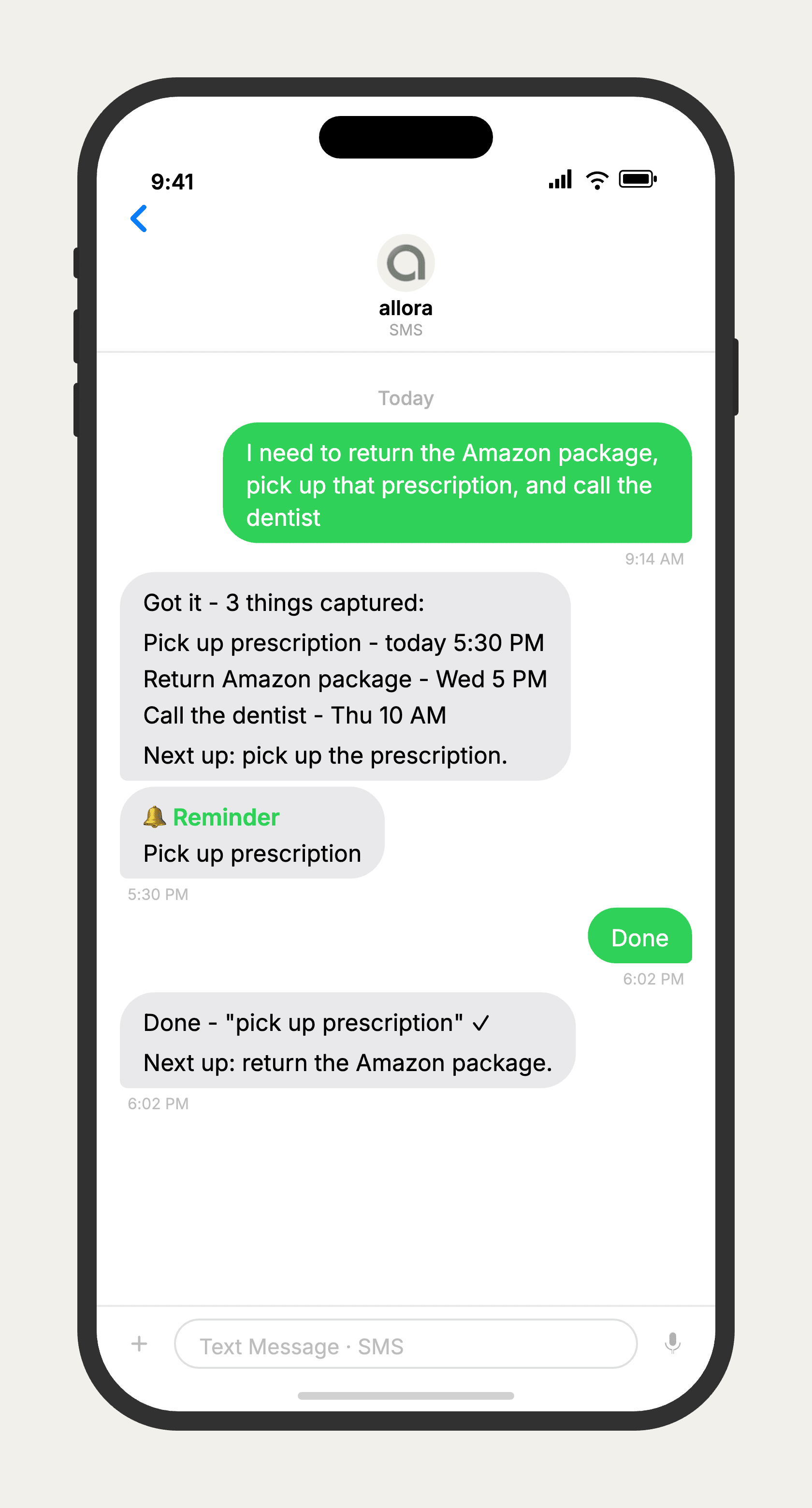
allora vs OneNote
allora and OneNote solve different problems. OneNote is a genuinely strong free-form notebook - great for typing, drawing, clipping web pages, and organizing long-form research into notebooks and sections. But it has no built-in reminder system: getting nudged requires manually linking a note to an Outlook task. allora does the opposite - it has no notebook, no canvas, no organization to maintain. You text what you need to remember, and allora reminds you at the right time. If you need a place to think and organize research, OneNote is the better tool. If you need something to actually remind you, allora is built for that.
Features based on publicly available information as of 2026. OneNote features may vary by platform and Microsoft account tier.
Tired of writing reminders that never remind you?
allora works by text. No downloads, no notebooks, no system to maintain.
Try It FreeWhat allora can do
What OneNote Can't Do
allora goes beyond notes. Everything works by text message.
Text Message Reminders
Set one-time or recurring reminders by texting in plain English. allora texts you back when the moment arrives.
Voice Memos
Send a voice note instead of typing. allora transcribes it and turns it into a task or reminder automatically.
Calendar-Aware Scheduling
Connect Google or Apple Calendar. allora checks your schedule and finds the right time for reminders.
Article & Video Summaries
Send any article URL or YouTube link. allora summarizes it and saves the key points for you.
Notes & Shopping Lists
Text a grocery list or a quick note. allora keeps it organized and sends it back when you need it.
Inspiration Mode
Get daily affirmations, motivational quotes, journal prompts, or sweet messages - on your schedule.
Tasks & Projects
Capture tasks in a text. allora organizes them, tracks progress, and nudges you to keep moving.
Works on Any Phone
No app to download. allora works entirely by text message - iPhone, Android, or any phone that texts.
allora vs OneNote - Common Questions
OneNote is a free-form digital notebook - great for typing, drawing, clipping web content, and organizing long-form research into notebooks and sections. allora is not a notebook at all. It works entirely by text message and focuses on one thing: getting you a reminder at the right time, with nothing to open or organize.
Not for note-taking. If you use OneNote to organize research, meeting notes, or a digital scrapbook, that's a real strength of OneNote and allora doesn't try to compete with it. But if what you actually want is 'remind me to do this later' and OneNote's manual Outlook-task setup feels like overkill, allora is built for exactly that.
Only indirectly. OneNote itself doesn't have a native reminder system - you have to link a note to an Outlook task and set a due date and time manually. allora reads your text in plain language ('remind me to call the vet Thursday at 10') and schedules it automatically, no linking required.
OneNote is free with a Microsoft account. allora is free for 3 days, then $15/mo. They're solving different problems - OneNote is a note-taking canvas, allora is a reminder system that lives in your texts. Many people use both.
Yes - because allora works via text message, it runs on any phone that can send and receive texts. No app store, no specific OS, no Microsoft account required.
Yes. OneNote rewards people who invest time in notebooks, sections, and tags. If that structure never stuck for you and reminders kept slipping through, allora skips the structure entirely - you just text what you need to remember.
Absolutely. Keep OneNote for long-form notes and research. Text allora the action items and deadlines buried inside those notes so they actually get followed up on, instead of sitting unread in a notebook.