Skylight Calendar App: Add Events by Text Instead of Typing Them In
Skylight Calendar already syncs with Google, Apple, and Outlook calendars. allora reads and writes those same calendars by text. Put the two together and you can add or change what shows up on your Skylight without opening Skylight's app or standing at the frame.
Key Takeaways
Skylight Calendar is a family display, not a calendar service of its own - it syncs with the Google, Apple, and Outlook calendars you already use. allora is a text-based assistant that reads and writes those same calendars: text it an appointment and it lands on your Google, Apple, or Outlook calendar with the date, time, and details filled in. Skylight's own sync then carries it onto your display, usually within a few minutes. allora does not connect to Skylight directly - it is upstream of it, doing the typing so you do not have to.
Is there a Skylight calendar app that lets you add events by text?
Not from Skylight itself - Skylight's own apps and its frame are built around a touchscreen and a companion mobile app. But Skylight was designed to sit downstream of the calendars you already have. Its own support documentation confirms two-way sync with Google Calendar and Apple iCloud Calendar, and one-way sync (Outlook into Skylight) with Microsoft Outlook.
That matters because it means Skylight is not the only place events have to be entered. Anything you add to the underlying Google, Apple, or Outlook calendar shows up on the Skylight automatically. So the real question is not "does Skylight have a way to add events by text" - it is "can I add events to the calendar Skylight already syncs with, by text." That part, allora does.
How texting allora shows up on your Skylight
It takes three steps:
- Connect your calendar to allora once. Google, Apple, or Outlook, the same one you already connected to Skylight.
- Text allora the appointment in plain language. What it is, the day, the time, and any details.
- Skylight picks it up on its own sync. Usually within a few minutes. allora never touches the frame directly.
Connect your Google, Apple, or Outlook calendar to allora once, the same way you already connected it to Skylight. From then on, text allora an appointment in plain language - what it is, the day, the time, and any details - and allora adds it directly to that calendar.
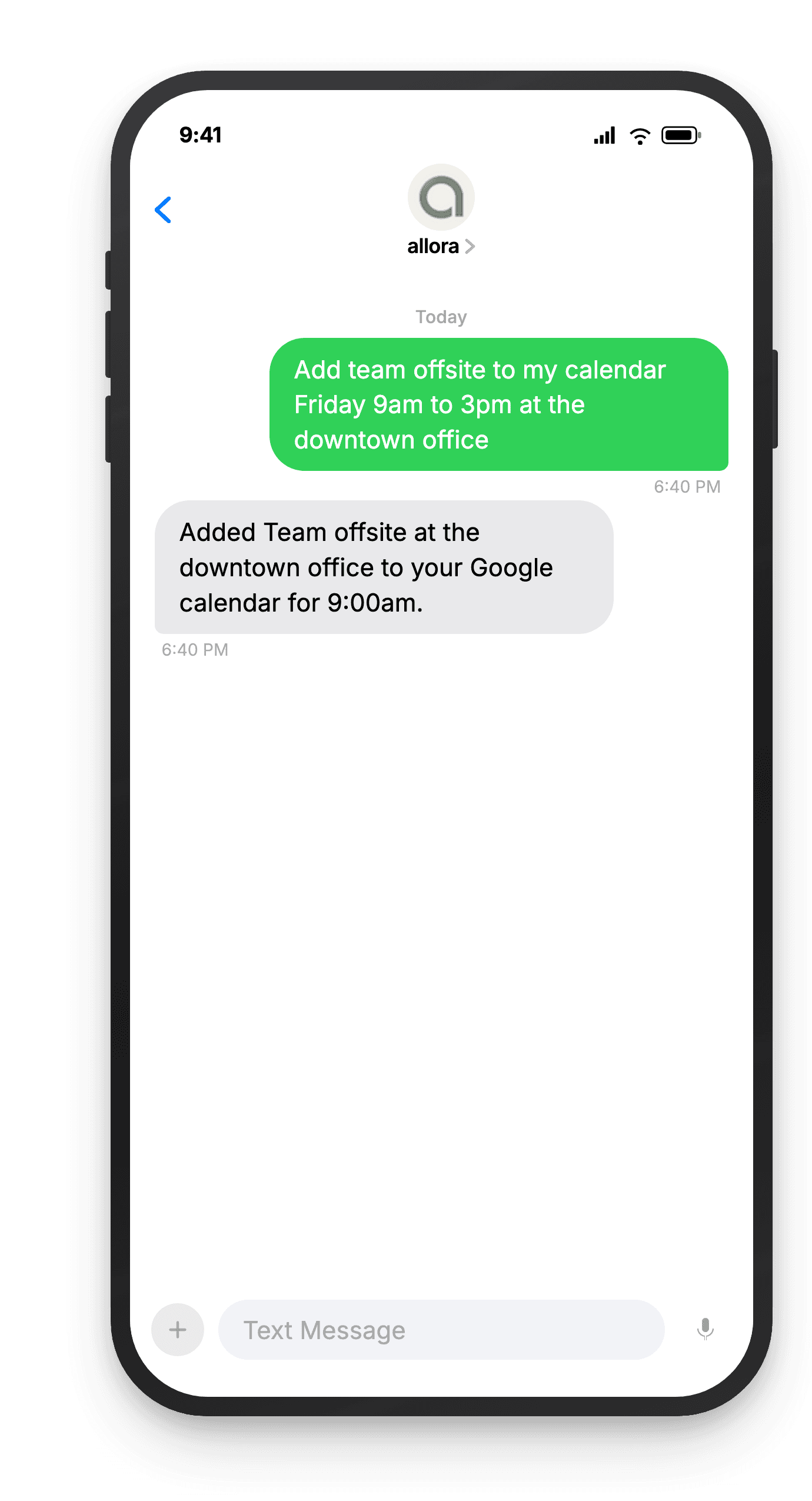
From there, it is Skylight's own sync doing the work it was already built to do - pulling the new event from your Google, Apple, or Outlook calendar onto the frame, usually within a few minutes. allora never touches Skylight directly; it just means one fewer place you have to open and type.
Changing an event without walking up to the frame
Plans move. Text allora the new time, a location change, or a cancellation, and it updates the same calendar entry - no retyping the whole event, no standing at the Skylight to edit it by hand.
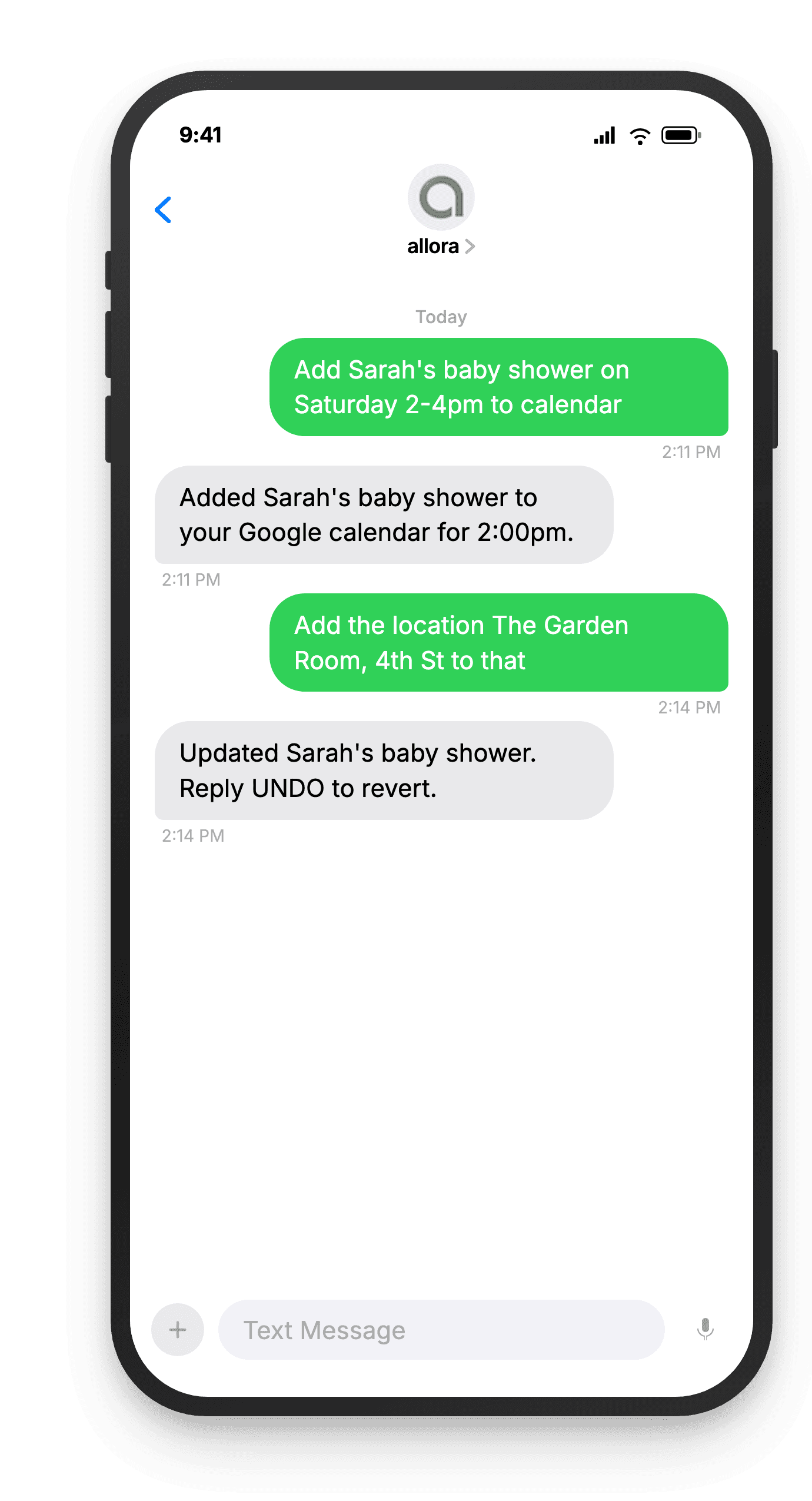
One thing worth knowing before you rely on this for a shared family calendar: Skylight's Outlook sync only flows one direction, from Outlook into Skylight. That is the direction this needs anyway, since allora is writing the event on the Outlook side - but it does mean an edit made directly on the Skylight frame itself will not flow back to Outlook. Google and Apple iCloud sync both ways.
Frequently asked questions
No - allora does not connect to Skylight directly. allora connects to your Google, Apple, or Outlook calendar. Skylight already syncs with those same calendars on its own, so an event allora adds or changes shows up on your Skylight display through Skylight's existing sync, not through a direct allora-to-Skylight connection.
Connect your Google, Apple, or Outlook calendar to Skylight once (Skylight's own setup, done from the Skylight app or account). Then text allora the event - what it is, when, and where - and allora adds it to that same calendar. Skylight's sync picks it up from there, usually within a few minutes.
It depends on the calendar. Skylight's Google Calendar and Apple iCloud Calendar sync is two-way, so events created on either side stay in sync. Outlook sync is one-way, from Outlook into Skylight - which is exactly the direction needed here, since allora is writing the event on the Outlook side.
Yes, indirectly. Text allora to move, rename, or update an event on your connected Google, Apple, or Outlook calendar, and the change flows to your Skylight the same way a new event would - through Skylight's own sync with that calendar.
Where allora fits in
allora is not a Skylight integration - it is a text-based assistant that reads and writes your Google, Apple, or Outlook calendar. Text it an appointment and it lands on that calendar with the date, time, and details filled in, then flows onto your Skylight through the sync Skylight already has.
Keep reading
Get events onto your calendar without typing them in
Text allora an appointment. It lands on your Google, Apple, or Outlook calendar - and syncs to your Skylight from there.
Try It Free