The Shared Calendar App That Runs on Text
You already share a calendar with your partner. allora is the fastest way to fill it in - text a kid's appointment or a school deadline and it's on the calendar before you'd have finished opening the app.
Start with 3 days free, then choose annual or monthly pricing.
Running a Household Shouldn't Mean Being the Only One Who Remembers
Permission slips, pickup times, practice schedules, a dentist appointment squeezed between two other things - the details of running a household pile up fast, and someone has to hold all of it. allora doesn't replace the calendar you already share with your partner. It just gets things onto it before you have a chance to forget them.
Text it before it disappears
You hear about picture day in the pickup line, or the dentist calls to confirm while you're making dinner. Text allora right then - no need to remember it long enough to open an app later.
It lands where your household already looks
allora writes to your Google or Apple Calendar, the one your household already checks. Nothing new to open, nothing new to teach a partner to use.
You still get the reminder text
A calendar entry is easy to add and easy to forget to check. allora also texts you before the appointment or deadline, so it doesn't just sit there unopened.
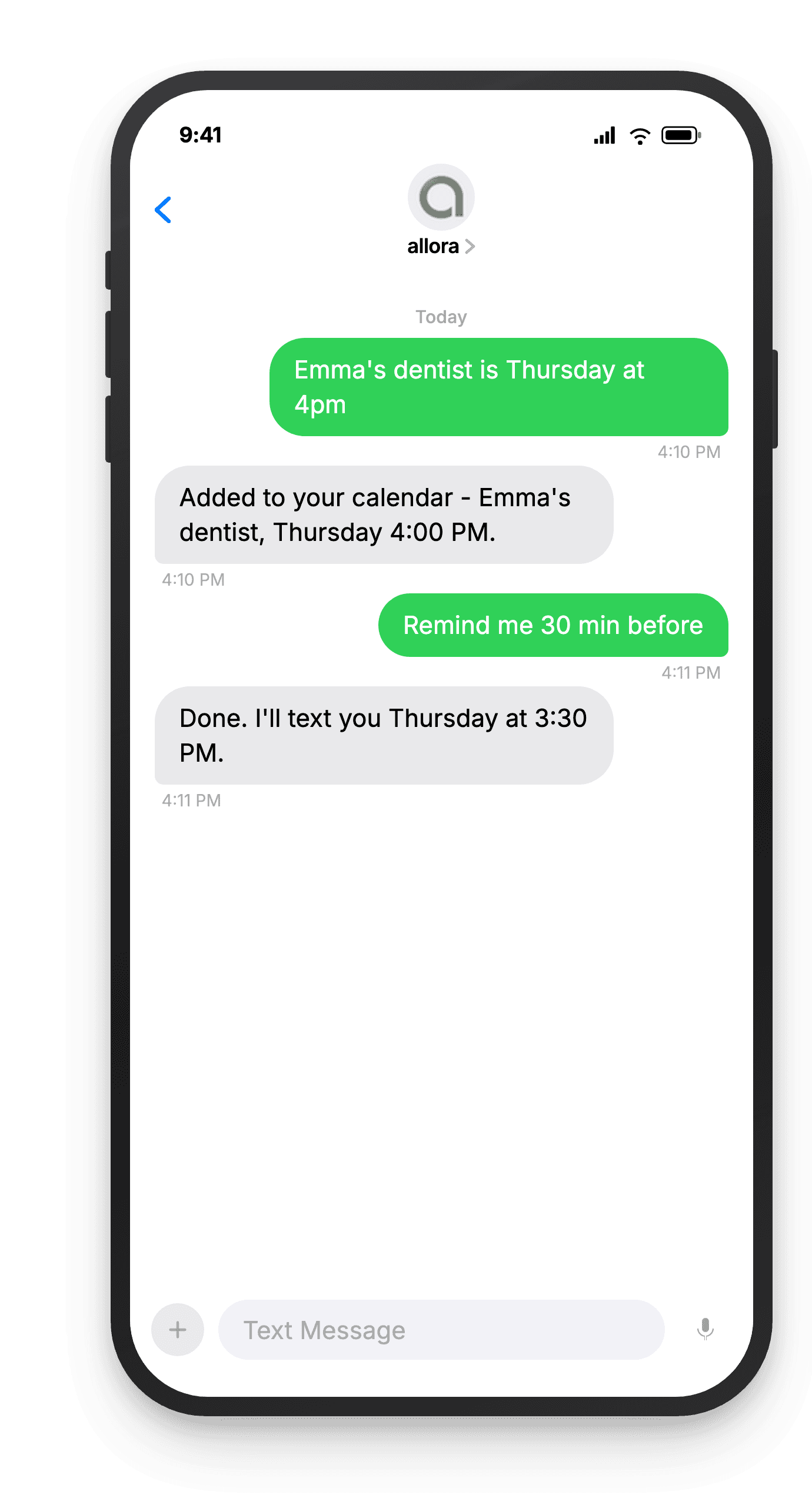
A kid's appointment, texted in, added to the calendar.
From Text to Shared Calendar in Seconds
No new app for your household to learn. allora fills in the calendar you're both already looking at.
Text allora the appointment, deadline, or pickup time
"Emma's dentist is Thursday at 4pm" or "soccer picture day is the 12th, forms due Friday." Text it the moment you hear about it, from wherever you are - the school pickup line, the doctor's waiting room, a group text with the other parent.
Emma's dentist Thursday at 4pm
It lands on the calendar you already use
allora connects to your Google or Apple Calendar and adds the event there - not to a new app, not to a separate list. If that calendar is already shared with your partner the normal way (Google or Apple family sharing), they see it appear too.
Added: Emma - Dentist, Thu 4:00 PM
You get a reminder text so nothing gets missed
allora texts you back before the appointment, the deadline, or the pickup - so it's not just sitting on a calendar nobody opens. Reply to reschedule or mark it done, no app required.
Reminder: Emma's dentist at 4pm today
What Households Text Into Their Shared Calendar
If it has a date or a time and someone in the house needs to know about it, it belongs on the shared calendar.
Kids' appointments
"Emma's dentist is Thursday at 4pm." allora adds it to your calendar and reminds you before it's time to leave.
School deadlines
"Permission slip due Friday" or "picture day is the 12th." Text it the moment the note comes home, before it gets lost in a backpack.
Pickup and drop-off times
"Practice ends at 5:30 Tuesday, I'm on pickup." A reminder text lands with enough lead time to actually leave on time.
Household bills and deadlines
"Rent is due the 1st" or "cancel the trial by the 15th." Recurring or one-time, allora keeps due dates on the calendar and texts you before they hit.
Groceries and household items
"We're almost out of paper towels." Text it to a running list so it's there the next time either of you is at the store.
Coordinating with a partner
"Remind me to ask Sam about Saturday." Get the small coordination tasks off your mental list and into a reminder that actually follows up.
Ready to stop being the household's only calendar?
Text the appointment, the deadline, or the pickup time. allora puts it on the calendar you already share.
Try It FreeWhat allora can do
More Than Just a Calendar
allora handles the whole brain dump, not just the dates. Here's everything it can do by text.
Text Message Reminders
Set one-time or recurring reminders by texting in plain English. allora texts you back when the moment arrives.
Voice Memos
Send a voice note instead of typing. allora transcribes it and turns it into a task or reminder automatically.
Calendar-Aware Scheduling
Connect Google or Apple Calendar. allora checks your schedule and finds the right time for reminders.
Article & Video Summaries
Send any article URL or YouTube link. allora summarizes it and saves the key points for you.
Notes & Shopping Lists
Text a grocery list or a quick note. allora keeps it organized and sends it back when you need it.
Inspiration Mode
Get daily affirmations, motivational quotes, journal prompts, or sweet messages - on your schedule.
Tasks & Projects
Capture tasks in a text. allora organizes them, tracks progress, and nudges you to keep moving.
Works on Any Phone
No app to download. allora works entirely by text message - iPhone, Android, or any phone that texts.
Shared Calendar App - Common Questions
allora is the fastest way to add to the calendar you already share. You text an appointment, a school deadline, or a pickup time, and allora puts it directly on your Google or Apple Calendar. If you've already turned on Google's or Apple's own calendar sharing with your partner or household, they see the update the moment it lands - because it's the same shared calendar, just filled in faster.
No. allora connects to one calendar - your Google or Apple account - and reads and writes to it. The sharing itself is a native Google or Apple feature. If your household calendar is already shared between you and a partner, allora's additions show up for both of you automatically. allora does not have a separate joint inbox or a way for other people to text allora on your behalf.
Each allora account connects to one phone number and one calendar connection. Your partner would need their own allora number connected to their own calendar. What both of you can share is the underlying Google or Apple calendar itself, using that platform's normal sharing settings - so entries either of you make anywhere show up on the same shared calendar.
Anything with a date or time. Kids' appointments, school deadlines and permission slip due dates, pickup and drop-off times, practice and rehearsal schedules, bill due dates, grocery runs, chores - if you can describe it in a sentence, allora can add it to the calendar and remind you before it happens.
No. allora works entirely by text message. You text the appointment or deadline, allora adds it to your connected Google or Apple Calendar, and you get a reminder text before it's due. The calendar app itself is whichever one you already use - allora just fills it in faster than typing it in manually.
They're the same underlying connection - allora reads and writes to your Google or Apple Calendar. This page focuses on the household use case: texting kids' appointments, school deadlines, and pickup times into the calendar your family already relies on, so whoever else can see that calendar sees the update too.
allora checks your connected calendar before scheduling reminders, so it can flag when a new appointment overlaps with something already on your calendar. It won't move or edit events your partner or family added directly to the shared calendar - it works alongside what's already there.
allora offers a 3-day free trial with full access to calendar sync, reminders, and everything else. After the trial, it's $15/month or $90/year.
You might also like
allora for Busy Parents
How busy parents use allora to run the household without keeping it all in their head.
Read more →Calendar Sync
How allora connects to Google and Apple Calendar to read and write your schedule.
Read more →Notes & Shopping Lists
Text a grocery list or a quick note. allora keeps it organized and sends it back when you need it.
Read more →Best Reminder App in 2026
An honest guide to reminder apps for iPhone and Android, and the text-based alternative.
Read more →