allora vs Trello: A Simpler Alternative
Trello is built to visualize how work moves through stages. allora is for the person who just wants a text at the right time - no board to check, no cards to move.
Start with 3 days free, then choose annual or monthly pricing.
The Problem With Boards You Stop Visiting
The board only helps if you visit it
Trello never reaches out. It sits open in a tab or buried behind an app icon, waiting for you to remember to check it - and most people stop after the first few weeks.
Cards pile up, nothing nudges you
Due dates live quietly on the card. Without opening the board, nothing tells you a card is overdue. The list grows. The habit of checking it fades.
Great for visualizing work, not for remembering it
Columns and drag-and-drop are genuinely useful for seeing project stages. They're not built to make sure a single reminder actually reaches you when it matters.
One text. Three tasks sorted.
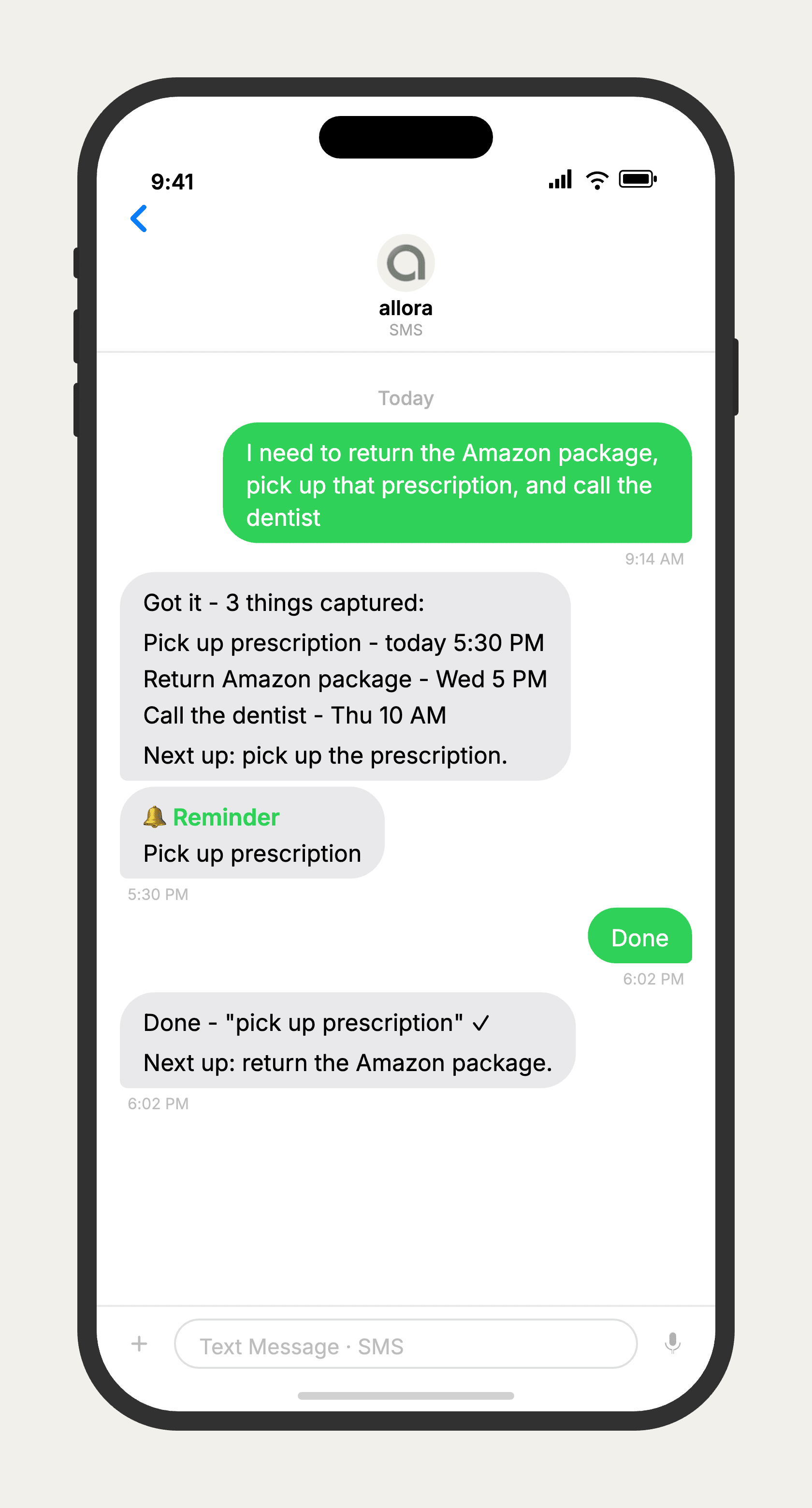
allora vs Trello
allora is not a replacement for Trello's board - it's a replacement for the habit of checking one. Trello is genuinely strong at visualizing workflow stages: cards moving through lists is a great way to see where team work stands. What it doesn't do is reach out to you. allora is the opposite - no board, no cards, just a text thread that tells you what needs doing and when. If you use Trello for a team pipeline, keep it. If you set up a personal board and stopped opening it, allora is built for exactly that gap.
Features based on publicly available information as of 2026. Trello features may vary by plan and Power-Ups installed.
Done checking boards nothing reminds you about?
allora works by text. No downloads, no boards, no cards to move.
Try It FreeWhat allora can do
What Trello Can't Do
allora goes beyond a board. Everything works by text message.
Text Message Reminders
Set one-time or recurring reminders by texting in plain English. allora texts you back when the moment arrives.
Voice Memos
Send a voice note instead of typing. allora transcribes it and turns it into a task or reminder automatically.
Calendar-Aware Scheduling
Connect Google or Apple Calendar. allora checks your schedule and finds the right time for reminders.
Article & Video Summaries
Send any article URL or YouTube link. allora summarizes it and saves the key points for you.
Notes & Shopping Lists
Text a grocery list or a quick note. allora keeps it organized and sends it back when you need it.
Inspiration Mode
Get daily affirmations, motivational quotes, journal prompts, or sweet messages - on your schedule.
Tasks & Projects
Capture tasks in a text. allora organizes them, tracks progress, and nudges you to keep moving.
Works on Any Phone
No app to download. allora works entirely by text message - iPhone, Android, or any phone that texts.
allora vs Trello - Common Questions
Trello is a visual board tool - cards move through lists like To Do, Doing, Done. It's great for seeing the shape of a project. allora doesn't have a board at all. It works entirely by text message, and instead of you checking a board, it texts you when something needs attention.
That's the exact gap allora fills. A board only helps while you're visiting it - nothing about Trello reaches out to you. allora flips that: you text what you need to remember, and allora texts you back at the right time. There's no board to fall out of the habit of checking.
For personal reminders and simple task tracking, yes. If you use Trello to visualize a multi-stage workflow or a team pipeline, that's not what allora does - allora has no board or card view. allora is for remembering things at the right time, not visualizing where work stands.
No. allora is intentionally not a visual tool. There are no boards, columns, or drag-and-drop cards. You text what you need to remember, and allora keeps your list and reminds you - no board to organize or maintain.
allora is free for 3 days, then $15/mo. Trello also has a free tier, but Trello's free tier is about board limits and Power-Up access - it doesn't get you a system that proactively reminds you. allora's cost buys reminders that reach you, not more board features.
Yes - because allora works via text message, it runs on any phone that can send and receive texts. No app store, no specific OS required, no board to load. iPhone, Android, even older phones all work.
Yes. There's no import tool, but allora doesn't need one. Just start texting the tasks and reminders you were tracking on your board. For recurring cards, text it once and allora schedules the series going forward. If you still need the visual pipeline view for team work, Trello and allora can coexist - allora for personal reminders, Trello for the team board.